
Introduction to 3D printed computer case feet
If your PC case sits on the floor like mine, you’ve probably noticed two problems: dust buildup and restricted airflow. Instead of buying costly stands or generic wheels, I decided to design and print my own 3D printed PC case feet.
In this guide, I’ll share how I created these custom risers with my 3D printer, the tools I used, the challenges I faced, and how you can easily make your own. This simple PC case feet mod improved cooling, reduced dust, and gave my rig a unique look.
Key Takeaways
What are 3D printed PC case feet?
They are custom risers designed on a computer and printed with a 3D printer. Their main purpose is to lift your computer case off the ground, improving airflow and reducing dust.
Why should I make my own instead of buying case stands or wheels?
Store-bought solutions often block airflow, are prone to breaking, or don’t fit your case well. A 3D printed PC case feet mod is cheap, customizable, and tailored to your exact needs.
What software and tools do I need?
At minimum: a 3D printer, filament (PLA, PETG, or ABS), and slicing software like Cura. Optionally, you can use design tools like Fusion 360 or Tinkercad if you want to create your own model.
What filament works best for PC case risers?
PLA works fine for most builds. For more strength and heat resistance, PETG or ABS are better.
Can 3D printed PC case feet support heavy gaming PCs?
Yes — if printed with solid infill (30–40% or more) and a durable filament, they can easily support a full gaming tower. Always test one foot before printing a full set.
Table of Contents
Why I 3D Printed My PC Case Feet
Many “PC case mod ideas” focus on flashy lights or water cooling, but airflow is just as important. My stock feet were too short, and while I had enough desk space, I didn’t want to move the case.
I’d tried [computer case wheels] before, but they blocked airflow and sometimes broke under weight. That’s when I realized I could design my own custom PC case risers — strong enough to lift my case, stylish enough to look intentional, and cheap to make. Plus my Long Career and Hobby is based around doing it myself.
Tools & Materials for a PC Case Feet Mod
Here’s what I used:
- 3D Printer: Creality Ender 3 V2
- Filament: PLA in Sky Blue (stood out against my white case + beige carpet)
- Slicer Software: Cura + Creality Slicer for scaling
💡 Tip: You don’t need advanced tools. This is a simple PC case leg 3D print project anyone with a basic 3D printer can attempt.
I used the Cura software, which I had already installed on my computer and is available free here.
How I Designed & Printed Custom PC Case Risers
I started on Thingiverse, browsing designs. I found one that was close, but not quite right, so I tweaked it.
- Original Design: 80 mm × 80 mm × 25 mm
- Scaled Design: 60 mm × 60 mm × 18 mm (to fit under my case)
I printed four feet in under a day. No painting or sanding was needed — the blue PLA looked great right off the printer.
This simple change transformed them into effective custom PC case risers that raised my system just enough for better airflow.

Challenges While Printing PC Case Feet
Like most 3D printing projects, I had issues to overcome:
- Bed Adhesion: Two feet lifted slightly because it was a cold day.
- Fix: Closing the curtain near my printer helped stabilize temperature.
- Alternative Fixes: Use a heated enclosure, move the printer away from windows, or increase bed temperature.
These small adjustments ensured my PC case feet mod was successful.
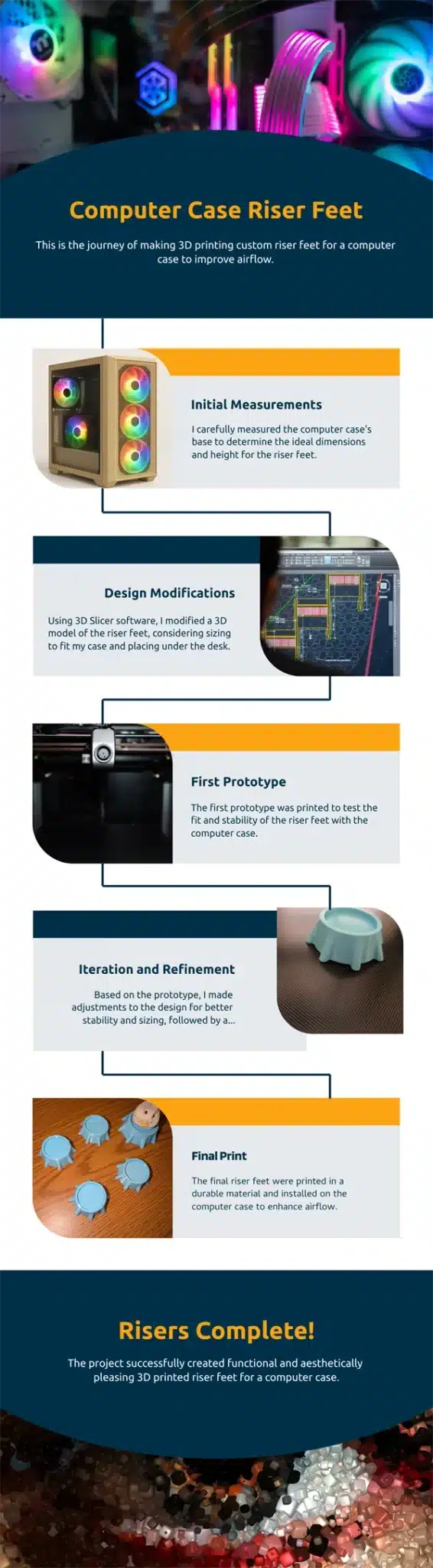
How You Can Make Your Own 3D Printed PC Case Feet
Here’s a simple step-by-step:
- Find an STL File – Start with one from Thingiverse or design your own.
- Adjust Dimensions – Scale taller or shorter depending on airflow needs.
- Select Infill – More infill = sturdier feet but longer print time.
- Test Print – Print one foot first to check fit.
- Complete Set – Once satisfied, print the rest.
These risers aren’t limited to PCs — they can be used for consoles, speakers, or even furniture.

Final Thoughts on My 3D Printed PC Case Feet
This was one of the simplest yet most effective PC case mods I’ve ever done. My case now has:
- ✅ Better airflow under the bottom filter
- ✅ Reduced dust intake (I clean every 3 months)
- ✅ A unique, custom look that no store-bought option could match
If you own a 3D printer, I highly recommend trying this PC case feet mod. It’s cost-effective, fun, and solves a real airflow problem. Share your own designs — I’d love to see how others improve their rigs with 3D printed PC case feet.